Audio Unit Removal/Installation
Audio Unit Removal/InstallationWith Navigation System
SRS components are located in this area. Review the SRS component locations, and the precautions and procedures before doing repairs or service.
NOTE:
- Eject all the discs before removing the audio unit to prevent damaging the CD player's load mechanism.
- Put on gloves to protect your hands.
- Take care not to scratch the dashboard and its related parts.
1. Make sure you have the anti-theft codes for the audio system and the navigation system, then write down the audio presets.
2. Remove the center lower cover.
3. Remove the bolts (A).
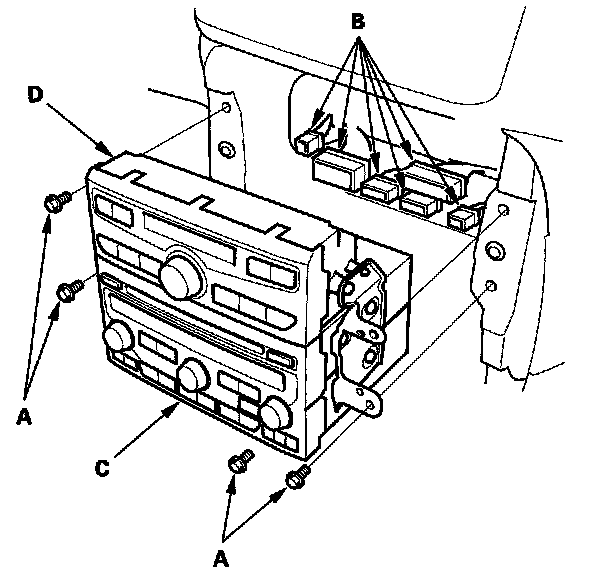
4. Disconnect the all connectors (B) from the audio unit (C) and the climate control unit (D).
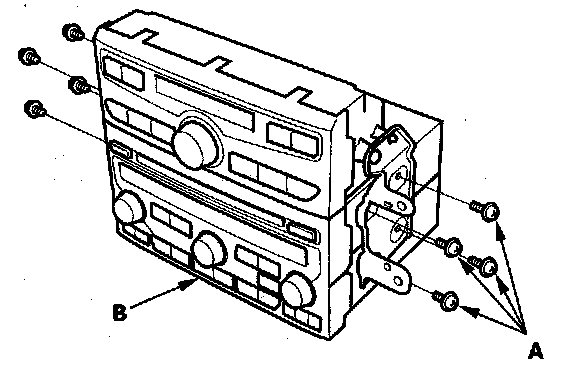
5. Remove the screws (A) and the audio unit (B).
6. Install the audio unit and the climate control unit in the reverse order of removal, and note these items:
- Make sure the audio unit and climate control unit connectors are plugged in properly, and the antenna lead is connected properly.
- Reset the power window control unit.
- Enter the anti-theft codes for the audio system and the navigation system, then enter the audio presets and set the clock.
Without Navigation System (Except LX model)
SRS components are located in this area. Review the SRS component locations, and the precautions and procedures before doing repairs or service.
NOTE:
- Eject all the discs before removing the audio unit to prevent damaging the CD player's load mechanism.
- Put on gloves to protect your hands.
- Take care not to scratch the dashboard and its related parts.
- If you are replacing the audio unit, write down the audio presets (if possible), and enter them into the new audio unit.
1. Make sure you have the anti-theft codes for the audio system, then write down the audio presets.
2. Remove the center panel.
3. Remove the bolts (A).
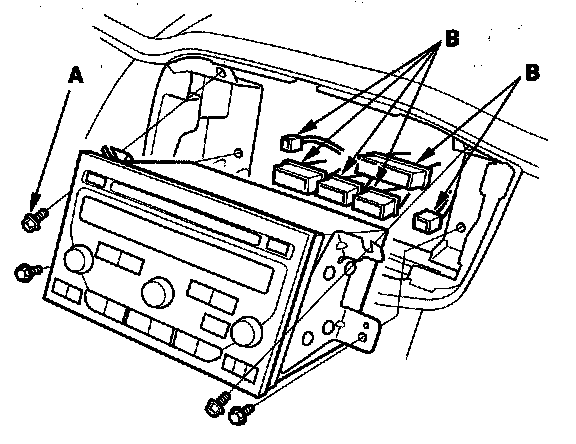
4. Disconnect the audio unit connectors (B) from the audio unit.
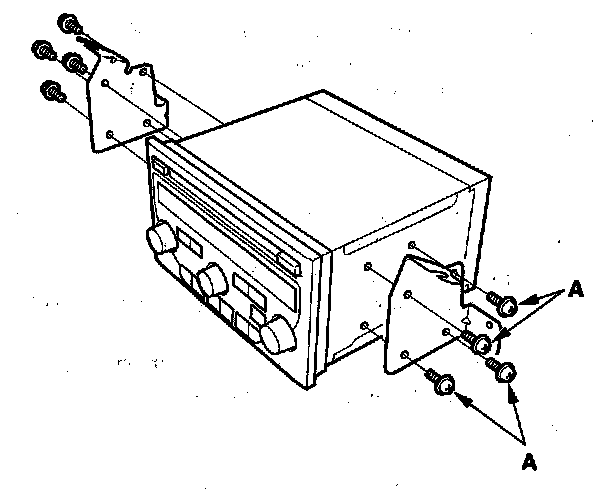
5. Remove the screws (A) from the audio unit.
6. Install the audio unit in the reverse order of removal, and note these items:
- Make sure the audio unit connectors are plugged in properly, and the antenna lead is connected properly.
- Reset the power window control unit.
- Enter the anti-theft codes for the audio system, then enter the audio presets and set the clock.
Without Navigation System (LX model)
SRS components are located in this area. Review the SRS component locations, and the precautions and procedures before doing repairs or service.
NOTE:
- Eject all the discs before removing the audio unit to prevent damaging the CD player's load mechanism.
- Put on gloves to protect your hands.
- Take care not to scratch the dashboard and its related parts.
- If you are replacing the audio unit, write down the audio presets (if possible), and enter them into the new audio unit.
1. Remove the center panel.
2. Remove the bolts (A).
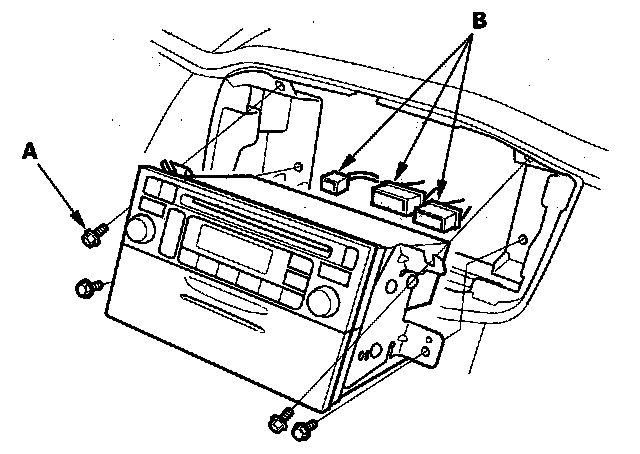
3. Disconnect the audio unit connectors (B) from the audio unit.
4. Remove the screws (A) from the audio unit.
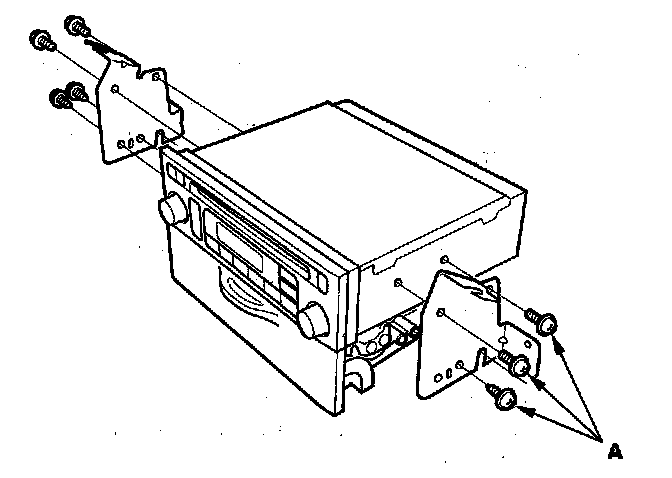
5. Install the audio unit in the reverse order of removal, and note these items:
- Make sure the audio unit connectors are plugged in properly, and the antenna lead is connected properly.
- Reset the power window control unit.
- Enter the audio presets and set the clock.